Sonos Ray Wireless Streaming Stereo Soundbar With WiFI
Sonos Ray Soundbar
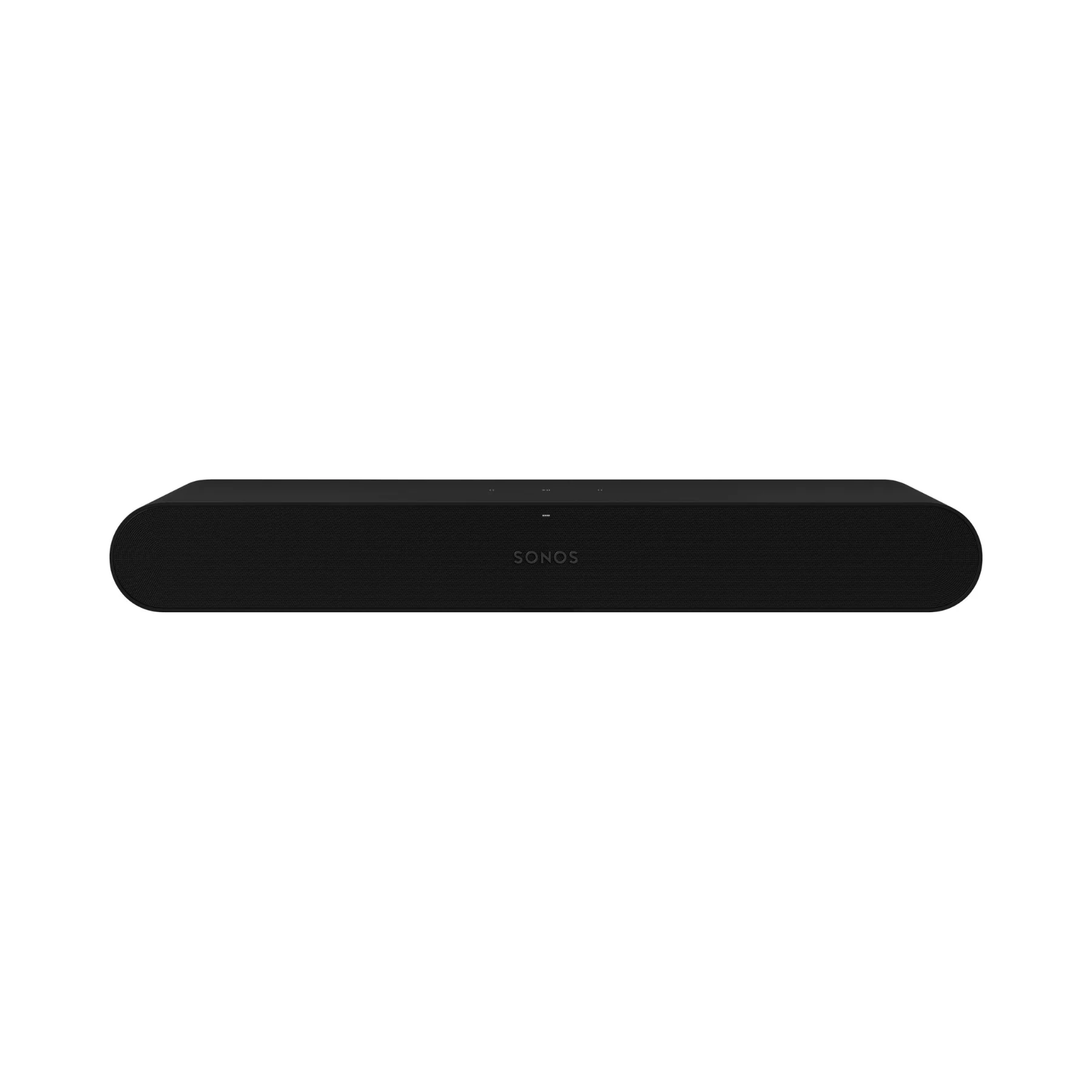
Upgrade TV, music, and gaming audio with Sonos Ray—an impressively compact soundbar engineered to deliver big, room-filling sound in smaller spaces. With four Class-D amplifiers powering two tweeters and two high-efficiency midwoofers, Ray produces crisp dialogue, balanced stereo detail, and surprisingly solid bass—without taking over your media console. Setup is fast and stress-free: plug in power, connect Ray to your TV’s optical output, and let the Sonos app guide you through tuning and control.
Trade Up Your Old Sonos Unit for up to 30% Off A New Ray
Designed with forward-facing acoustics, Ray performs beautifully whether it’s sitting under your TV or tucked into a console. Use your existing IR TV remote for streamlined control, tap the capacitive touch controls on top for quick adjustments, or stream music over WiFi when the TV is off. In the Sonos app, you can tailor your experience with Speech Enhancement and Night Sound, adjust EQ, and use Trueplay tuning (iOS-supported) to optimize sound for your room. Ray also supports Apple AirPlay 2 for easy playback from compatible Apple devices and can expand into a wireless surround setup when you add compatible rear speakers.
What It's Good At:
- Delivering clearer TV dialogue with Speech Enhancement and sound tuned for voice clarity
- Creating immersive stereo sound in bedrooms, offices, apartments, and smaller living rooms
- Easy optical setup for broad TV compatibility, plus IR TV remote syncing for simple control
- Streaming music, podcasts, and radio over WiFi with Apple AirPlay 2 support
- Late-night watching with Night Sound to tame loud effects while keeping voices audible
- Growing with your system—add Sonos speakers for wireless surrounds and multiroom audio
Sonos Ray Soundbar Full Specifications:
- Product type: Soundbar
-
Drivers / amplification:
- Four Class-D digital amplifiers (fine-tuned to Ray’s acoustic architecture)
- Two tweeters for crisp high-frequency response
- Two high-efficiency midwoofers for midrange accuracy and solid bass
- Bass reflex system: Proprietary low-velocity port design to minimize distortion and round out low-end frequencies
-
Sound & tuning features:
- Adjustable EQ (bass, treble, loudness via Sonos app)
- Trueplay tuning technology (iOS device required)
- Speech Enhancement (via Sonos app)
- Night Sound (via Sonos app)
- Home theater audio formats: Stereo PCM, Dolby Digital*, DTS Digital Surround* (*not an indication of a licensed decoder; decoded format shown in Sonos app)
- TV Audio Swap: Swap TV audio between the soundbar and one or two Sonos Ace headphones
- Controls: Capacitive touch controls for volume, play, pause, skip, and replay
- Status indicator: LED indicates connection, mute status, and errors
-
Connectivity:
- WiFi: 2.4 GHz 802.11 b/g/n with a broadcast-capable router
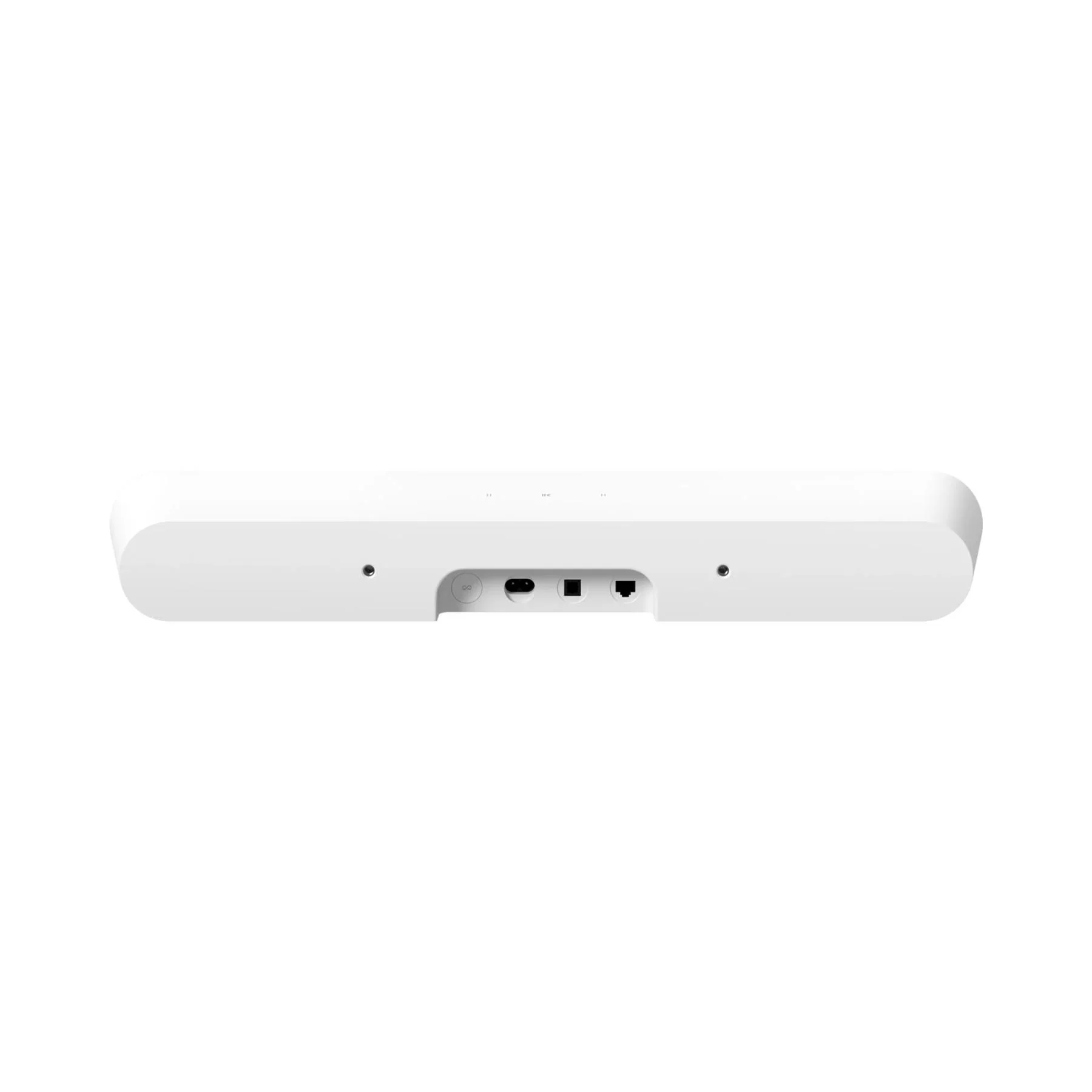
- Optical: Connect to TV’s optical port (optical cable included)
- Ethernet: 10/100 port for hardwiring to router
- Infrared (IR) receiver: Syncs with TV remote for streamlined control
- Apple AirPlay 2: Works with AirPlay 2 on Apple devices (iOS 11.4 and higher)
- Power: Auto-switching 100–240V, 50/60Hz AC universal input
- CPU: Quad Core, 1.4 GHz A-53
- Memory: 1GB SDRAM; 4GB NV
-
Dimensions:
- Height: 2.76 in (70 mm)
- Width: 21.93 in (557 mm)
- Depth: 3.66 in (93 mm)
- Weight: 4.19 lbs (1.9 kg)
- Colors: Black, White
- Finish: Matte
- Mounting: M5 threaded mounting socket
-
Box contents:
- Sonos Ray
- Power Cable I — Length: 6 ft (2 m)
- Optical Audio Cable — Length: 4.9 ft (1.5 m)
- Documentation — Quickstart Guide and legal/warranty information
-
Requirements:
- WiFi
- Internet connection
- Power source (nearby electrical outlet)
- Sonos app (latest generation) running on a compatible device
- Sizing guidance: Recommended for TVs up to 55"
Sonos Ray Soundbar Q&A:
- How does Sonos Ray connect to my TV?
- Ray connects through your TV’s optical audio output using the included optical cable, making it compatible with many TVs that don’t have HDMI eARC.
- Can I use my current TV remote to control the soundbar?
- Yes. Ray has an infrared (IR) receiver that syncs with compatible IR TV remotes, so you can control volume and playback without switching remotes.
- Does Sonos Ray support WiFi streaming when the TV is off?
- Yes. You can stream music, radio, podcasts, and more over WiFi using the Sonos app, Apple AirPlay 2, and supported service integrations.
- What audio formats does Sonos Ray support for TV?
- Ray supports Stereo PCM, Dolby Digital, and DTS Digital Surround. The Sonos app shows what format is being decoded during playback.
- Will Sonos Ray work well in smaller rooms or tight spaces?
- Absolutely. Ray’s compact design and forward-facing acoustic layout are built to sound great on a shelf, under a TV, or inside a media console.
- How can I make dialogue clearer for movies and shows?
- Turn on Speech Enhancement in the Sonos app to boost vocal frequencies and improve clarity, especially for quieter dialogue.
- Is there a mode for late-night watching?
- Yes. Night Sound reduces the intensity of loud effects and lifts quieter details so you can hear everything without disturbing others.
- Can I expand Sonos Ray into surround sound later?
- Yes. You can add compatible Sonos speakers as rear surrounds and build a bigger Sonos system for more immersive home theater and multiroom audio.
Original: $219.00
-65%$219.00
$76.65More Images





Sonos Ray Wireless Streaming Stereo Soundbar With WiFI
Sonos Ray Soundbar
Upgrade TV, music, and gaming audio with Sonos Ray—an impressively compact soundbar engineered to deliver big, room-filling sound in smaller spaces. With four Class-D amplifiers powering two tweeters and two high-efficiency midwoofers, Ray produces crisp dialogue, balanced stereo detail, and surprisingly solid bass—without taking over your media console. Setup is fast and stress-free: plug in power, connect Ray to your TV’s optical output, and let the Sonos app guide you through tuning and control.
Trade Up Your Old Sonos Unit for up to 30% Off A New Ray
Designed with forward-facing acoustics, Ray performs beautifully whether it’s sitting under your TV or tucked into a console. Use your existing IR TV remote for streamlined control, tap the capacitive touch controls on top for quick adjustments, or stream music over WiFi when the TV is off. In the Sonos app, you can tailor your experience with Speech Enhancement and Night Sound, adjust EQ, and use Trueplay tuning (iOS-supported) to optimize sound for your room. Ray also supports Apple AirPlay 2 for easy playback from compatible Apple devices and can expand into a wireless surround setup when you add compatible rear speakers.
What It's Good At:
- Delivering clearer TV dialogue with Speech Enhancement and sound tuned for voice clarity
- Creating immersive stereo sound in bedrooms, offices, apartments, and smaller living rooms
- Easy optical setup for broad TV compatibility, plus IR TV remote syncing for simple control
- Streaming music, podcasts, and radio over WiFi with Apple AirPlay 2 support
- Late-night watching with Night Sound to tame loud effects while keeping voices audible
- Growing with your system—add Sonos speakers for wireless surrounds and multiroom audio
Sonos Ray Soundbar Full Specifications:
- Product type: Soundbar
-
Drivers / amplification:
- Four Class-D digital amplifiers (fine-tuned to Ray’s acoustic architecture)
- Two tweeters for crisp high-frequency response
- Two high-efficiency midwoofers for midrange accuracy and solid bass
- Bass reflex system: Proprietary low-velocity port design to minimize distortion and round out low-end frequencies
-
Sound & tuning features:
- Adjustable EQ (bass, treble, loudness via Sonos app)
- Trueplay tuning technology (iOS device required)
- Speech Enhancement (via Sonos app)
- Night Sound (via Sonos app)
- Home theater audio formats: Stereo PCM, Dolby Digital*, DTS Digital Surround* (*not an indication of a licensed decoder; decoded format shown in Sonos app)
- TV Audio Swap: Swap TV audio between the soundbar and one or two Sonos Ace headphones
- Controls: Capacitive touch controls for volume, play, pause, skip, and replay
- Status indicator: LED indicates connection, mute status, and errors
-
Connectivity:
- WiFi: 2.4 GHz 802.11 b/g/n with a broadcast-capable router
- Optical: Connect to TV’s optical port (optical cable included)
- Ethernet: 10/100 port for hardwiring to router
- Infrared (IR) receiver: Syncs with TV remote for streamlined control
- Apple AirPlay 2: Works with AirPlay 2 on Apple devices (iOS 11.4 and higher)
- Power: Auto-switching 100–240V, 50/60Hz AC universal input
- CPU: Quad Core, 1.4 GHz A-53
- Memory: 1GB SDRAM; 4GB NV
-
Dimensions:
- Height: 2.76 in (70 mm)
- Width: 21.93 in (557 mm)
- Depth: 3.66 in (93 mm)
- Weight: 4.19 lbs (1.9 kg)
- Colors: Black, White
- Finish: Matte
- Mounting: M5 threaded mounting socket
-
Box contents:
- Sonos Ray
- Power Cable I — Length: 6 ft (2 m)
- Optical Audio Cable — Length: 4.9 ft (1.5 m)
- Documentation — Quickstart Guide and legal/warranty information
-
Requirements:
- WiFi
- Internet connection
- Power source (nearby electrical outlet)
- Sonos app (latest generation) running on a compatible device
- Sizing guidance: Recommended for TVs up to 55"
Sonos Ray Soundbar Q&A:
- How does Sonos Ray connect to my TV?
- Ray connects through your TV’s optical audio output using the included optical cable, making it compatible with many TVs that don’t have HDMI eARC.
- Can I use my current TV remote to control the soundbar?
- Yes. Ray has an infrared (IR) receiver that syncs with compatible IR TV remotes, so you can control volume and playback without switching remotes.
- Does Sonos Ray support WiFi streaming when the TV is off?
- Yes. You can stream music, radio, podcasts, and more over WiFi using the Sonos app, Apple AirPlay 2, and supported service integrations.
- What audio formats does Sonos Ray support for TV?
- Ray supports Stereo PCM, Dolby Digital, and DTS Digital Surround. The Sonos app shows what format is being decoded during playback.
- Will Sonos Ray work well in smaller rooms or tight spaces?
- Absolutely. Ray’s compact design and forward-facing acoustic layout are built to sound great on a shelf, under a TV, or inside a media console.
- How can I make dialogue clearer for movies and shows?
- Turn on Speech Enhancement in the Sonos app to boost vocal frequencies and improve clarity, especially for quieter dialogue.
- Is there a mode for late-night watching?
- Yes. Night Sound reduces the intensity of loud effects and lifts quieter details so you can hear everything without disturbing others.
- Can I expand Sonos Ray into surround sound later?
- Yes. You can add compatible Sonos speakers as rear surrounds and build a bigger Sonos system for more immersive home theater and multiroom audio.
Product Information
Product Information
Shipping & Returns
Shipping & Returns
Description
Sonos Ray Soundbar
Upgrade TV, music, and gaming audio with Sonos Ray—an impressively compact soundbar engineered to deliver big, room-filling sound in smaller spaces. With four Class-D amplifiers powering two tweeters and two high-efficiency midwoofers, Ray produces crisp dialogue, balanced stereo detail, and surprisingly solid bass—without taking over your media console. Setup is fast and stress-free: plug in power, connect Ray to your TV’s optical output, and let the Sonos app guide you through tuning and control.
Trade Up Your Old Sonos Unit for up to 30% Off A New Ray
Designed with forward-facing acoustics, Ray performs beautifully whether it’s sitting under your TV or tucked into a console. Use your existing IR TV remote for streamlined control, tap the capacitive touch controls on top for quick adjustments, or stream music over WiFi when the TV is off. In the Sonos app, you can tailor your experience with Speech Enhancement and Night Sound, adjust EQ, and use Trueplay tuning (iOS-supported) to optimize sound for your room. Ray also supports Apple AirPlay 2 for easy playback from compatible Apple devices and can expand into a wireless surround setup when you add compatible rear speakers.
What It's Good At:
- Delivering clearer TV dialogue with Speech Enhancement and sound tuned for voice clarity
- Creating immersive stereo sound in bedrooms, offices, apartments, and smaller living rooms
- Easy optical setup for broad TV compatibility, plus IR TV remote syncing for simple control
- Streaming music, podcasts, and radio over WiFi with Apple AirPlay 2 support
- Late-night watching with Night Sound to tame loud effects while keeping voices audible
- Growing with your system—add Sonos speakers for wireless surrounds and multiroom audio
Sonos Ray Soundbar Full Specifications:
- Product type: Soundbar
-
Drivers / amplification:
- Four Class-D digital amplifiers (fine-tuned to Ray’s acoustic architecture)
- Two tweeters for crisp high-frequency response
- Two high-efficiency midwoofers for midrange accuracy and solid bass
- Bass reflex system: Proprietary low-velocity port design to minimize distortion and round out low-end frequencies
-
Sound & tuning features:
- Adjustable EQ (bass, treble, loudness via Sonos app)
- Trueplay tuning technology (iOS device required)
- Speech Enhancement (via Sonos app)
- Night Sound (via Sonos app)
- Home theater audio formats: Stereo PCM, Dolby Digital*, DTS Digital Surround* (*not an indication of a licensed decoder; decoded format shown in Sonos app)
- TV Audio Swap: Swap TV audio between the soundbar and one or two Sonos Ace headphones
- Controls: Capacitive touch controls for volume, play, pause, skip, and replay
- Status indicator: LED indicates connection, mute status, and errors
-
Connectivity:
- WiFi: 2.4 GHz 802.11 b/g/n with a broadcast-capable router
- Optical: Connect to TV’s optical port (optical cable included)
- Ethernet: 10/100 port for hardwiring to router
- Infrared (IR) receiver: Syncs with TV remote for streamlined control
- Apple AirPlay 2: Works with AirPlay 2 on Apple devices (iOS 11.4 and higher)
- Power: Auto-switching 100–240V, 50/60Hz AC universal input
- CPU: Quad Core, 1.4 GHz A-53
- Memory: 1GB SDRAM; 4GB NV
-
Dimensions:
- Height: 2.76 in (70 mm)
- Width: 21.93 in (557 mm)
- Depth: 3.66 in (93 mm)
- Weight: 4.19 lbs (1.9 kg)
- Colors: Black, White
- Finish: Matte
- Mounting: M5 threaded mounting socket
-
Box contents:
- Sonos Ray
- Power Cable I — Length: 6 ft (2 m)
- Optical Audio Cable — Length: 4.9 ft (1.5 m)
- Documentation — Quickstart Guide and legal/warranty information
-
Requirements:
- WiFi
- Internet connection
- Power source (nearby electrical outlet)
- Sonos app (latest generation) running on a compatible device
- Sizing guidance: Recommended for TVs up to 55"
Sonos Ray Soundbar Q&A:
- How does Sonos Ray connect to my TV?
- Ray connects through your TV’s optical audio output using the included optical cable, making it compatible with many TVs that don’t have HDMI eARC.
- Can I use my current TV remote to control the soundbar?
- Yes. Ray has an infrared (IR) receiver that syncs with compatible IR TV remotes, so you can control volume and playback without switching remotes.
- Does Sonos Ray support WiFi streaming when the TV is off?
- Yes. You can stream music, radio, podcasts, and more over WiFi using the Sonos app, Apple AirPlay 2, and supported service integrations.
- What audio formats does Sonos Ray support for TV?
- Ray supports Stereo PCM, Dolby Digital, and DTS Digital Surround. The Sonos app shows what format is being decoded during playback.
- Will Sonos Ray work well in smaller rooms or tight spaces?
- Absolutely. Ray’s compact design and forward-facing acoustic layout are built to sound great on a shelf, under a TV, or inside a media console.
- How can I make dialogue clearer for movies and shows?
- Turn on Speech Enhancement in the Sonos app to boost vocal frequencies and improve clarity, especially for quieter dialogue.
- Is there a mode for late-night watching?
- Yes. Night Sound reduces the intensity of loud effects and lifts quieter details so you can hear everything without disturbing others.
- Can I expand Sonos Ray into surround sound later?
- Yes. You can add compatible Sonos speakers as rear surrounds and build a bigger Sonos system for more immersive home theater and multiroom audio.